Description
Screenshots at the Speed of Thought
Other screenshot tools lag when trying to take a screenshot, other screenshot tools crash under heavy load. Ours is the first to reliably capture and paste every time with millisecond timing. No more jams, no more freezes, no more wasted time when you’re working to deadlines. Lifetime Upgrades. Buy Now to give it a go.
✨ Key Features
⚡ Quick Capture Mode
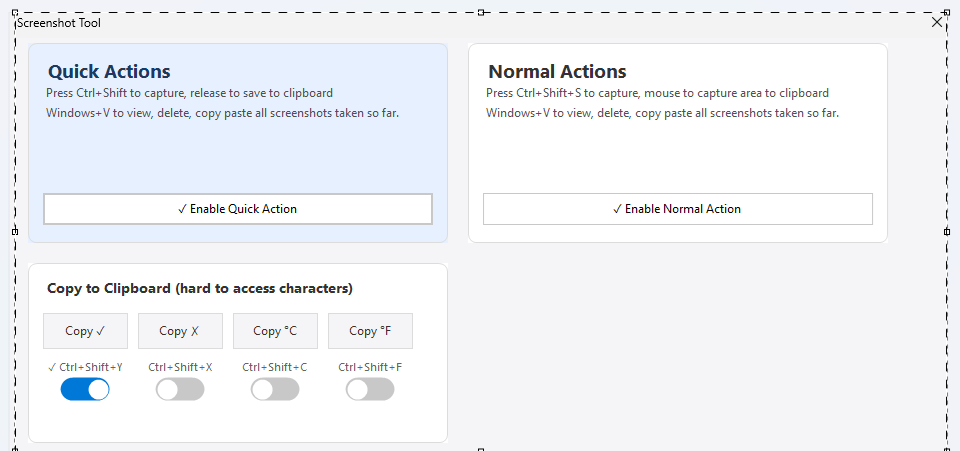
Hold Ctrl+Shift, drag to select your area, release to instantly copy to clipboard. Works every single time, even under heavy system load.
Ctrl + Shift + Drag
🎯 Precision Mode
Press Ctrl+Shift+S, then click and drag to select exactly what you need. Perfect for detailed documentation.
Ctrl + Shift + S
📋 Instant Clipboard
Every screenshot goes straight to your clipboard. Paste anywhere instantly. Use Win+V to access your full screenshot history.
Win + V for History
🛡️ Unmatched Reliability
Built with special STA threading code and millisecond retry attempts. While other tools jam up and fail, this captures flawlessly—every time.
Never Fails
✓ Special Characters
Instantly copy hard-to-find characters like ✓ ✗ °C °F with simple keyboard shortcuts. Perfect for documentation and forms.
Ctrl + Shift + Y/N/C/F
🪶 Ultra Lightweight
Runs silently in your system tray using minimal resources. Start with Windows option available. Always ready when you need it.
System Tray App
👤 No Installation Required
Runs as a portable app entirely in User Mode under your account. No administrator installation needed. Option to start with Windows.
Portable App
🇳🇿 Made in New Zealand
Designed and written entirely in New Zealand by Hamish Ahern—trusted by 50,000+ users in the Mitsubishi Evo car software community. No code was written in China.
100% NZ Built
⌨️ Special Characters at Your Fingertips
Stop searching for symbols. Copy them instantly with keyboard shortcuts.
Ctrl+Shift+Y
Ctrl+Shift+N
Ctrl+Shift+C
Ctrl+Shift+F
🔒 Our Trusted Privacy Policy
We will not collect or use your data
Your data will not be sold to third parties
100% offline — no data ever leaves your computer
No accounts, no sign-ups, no tracking
🔧 Details for Pros
What makes this tool technically superior—explained in plain English
“Built with special STA threading code”
STA stands for Single Threaded Apartment—a Windows programming model that ensures certain tasks (like dealing with the clipboard or UI) happen safely on one thread. The app is designed to avoid crashes or errors when working with screenshots and the clipboard, even when your system is under heavy load.
“Millisecond retry attempts”
An extremely fast retry mechanism. If it doesn’t succeed in copying or pasting a screenshot on the first try (due to system lag or resource contention), it tries again within milliseconds (thousandths of a second), making the process seem instant and seamless. Most tools just fail—we persist until it works.
“While other tools jam up and fail under heavy workloads…”
Competing screenshot tools often freeze or fail when under pressure—for example, when taking many screenshots in rapid succession, or when the system clipboard is being accessed by multiple applications. This tool is engineered to handle these edge cases gracefully.
“Captures and pastes flawlessly—every single time”
The result of all these design choices: highly reliable and responsive. No lost screenshots, no clipboard failures, no “please try again” moments. It just works.
In short: Engineered for speed and stability, even under intense use—built for professionals who take lots of screenshots rapidly and can’t afford tools that fail when deadlines are tight.
📦 What’s Included
🛡️ 30-day money-back guarantee — Try it risk-free!